
What can it help with?
AI is one of RMCL's main areas of exploration. It can explain versions, loaders, dependencies and launch messages. Within permitted scope, it can read instance information, find content, work with tasks or help design a skin.
You can use basic launcher features without configuring AI. This is not gameplay automation, and it cannot promise to fix every problem.
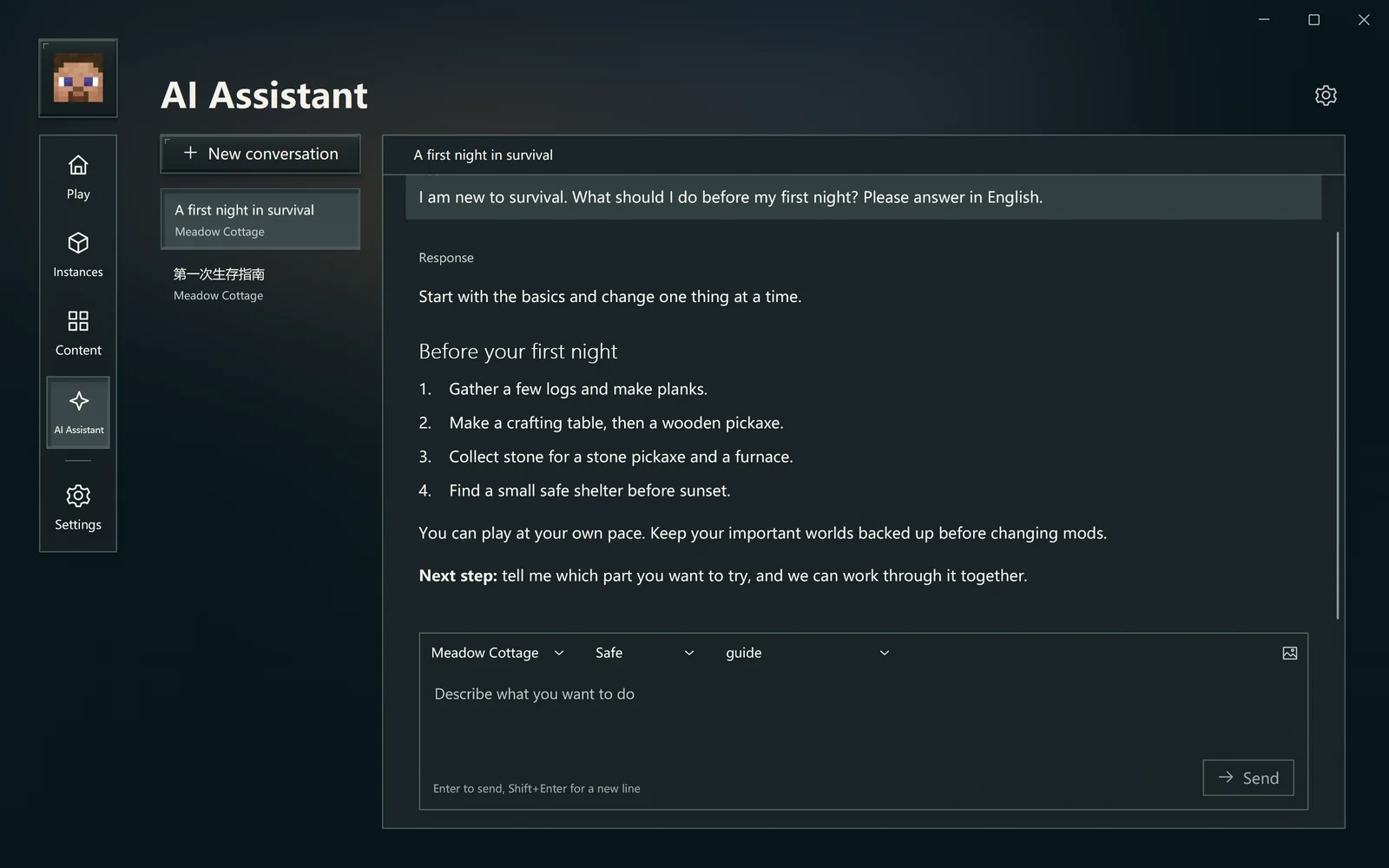
A specific instance and goal usually help more than “fix everything.”
1. Add a model service
Open the model services area in Settings → AI and choose Add service.
- Select your service type. OpenAI-compatible, Anthropic-compatible, Gemini and local models are supported.
- For an online service, enter the address and API key supplied by its provider. This is not your Microsoft password.
- Load the model list and select models to keep. If the service returns no list, enter an actual model identifier.
- Save, return to AI Assistant and choose the model.
A model service may bill separately. Check its terms before use. Whether a web chat subscription includes API usage depends on the provider; access to its chat website alone is not proof.
Local models do not need a separate inference service, but require an appropriate model file and enough device resources. Check the model's own instructions if unsure.
2. Start with a small question
Choose New chat and check the model and instance context. The instance selection determines the setup used in the next turn.
Try a request like:
This is my first time installing mods. Check the game version and loader for “Woodland Survival,” explain what I still need, and do not change any files yet.
This instance failed to start. Use the current logs to explain likely causes, distinguishing confirmed evidence from things that need checking.
I would like an inventory organization mod for this instance. Find compatible candidates and explain their versions and dependencies before I decide.
You can also describe a survival question directly. Answers come from your chosen model. For important actions, still check actual sources, game messages and operation results.
3. Understand operation permissions
A conversation can explain a problem. Actual tools are controlled by permissions and access scope.

The setting changes the initial mode for new ordinary conversations.
In Safe mode, an operation request appears above the input. Approve it once or decline it. The approval menu can also allow later calls to the same named tool in this conversation. Approving one tool does not allow every other tool; switching permission modes revokes existing tool grants.
For file or content changes, expand details to inspect the target, parameters and changes. Instance, folder, network and stale-review checks still apply.
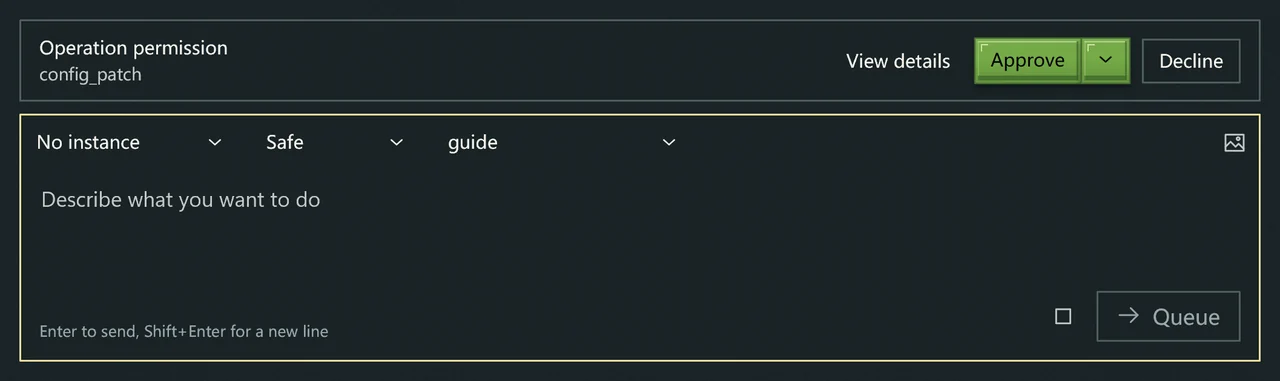
Operation approval appears above the input. Check it before approving or declining.
Allow all runs operations that already have the required scope directly. Keep the default Safe mode while learning what each action does, then decide whether to switch.
File and network access
File tools operate within authorized locations. The current data directory and app package data have fixed scopes. Add any other folder explicitly in settings and choose read-only or read-write access.
Network tools search or read websites. Disabling them does not disable the online model connection. A failed service, empty search or blocked page should remain a stated limitation rather than being replaced with guesses.
When it needs your answer
The assistant may ask a question, offer choices or wait for folder access. Respond to that request to continue the same goal rather than submitting a duplicate operation.
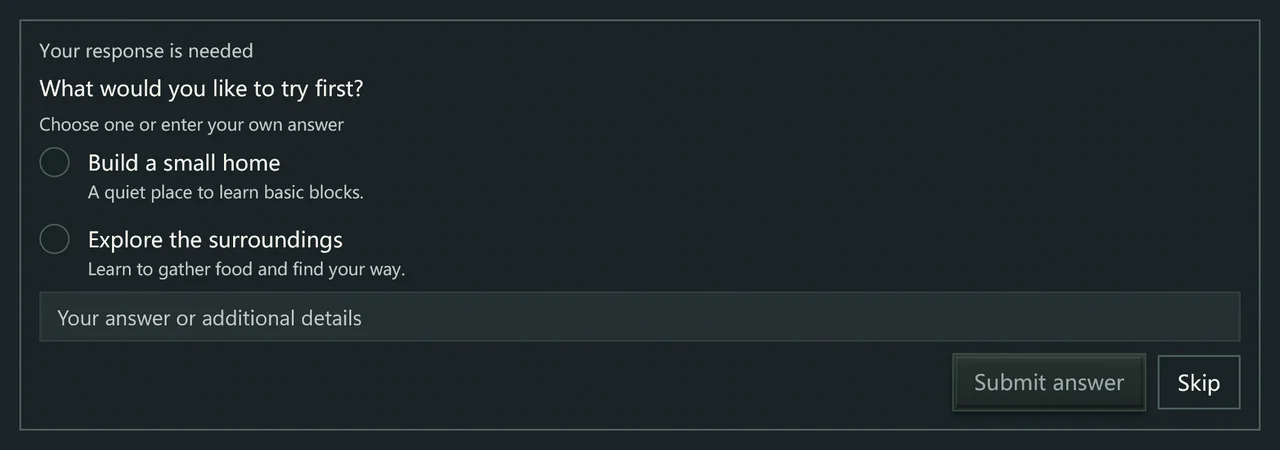
Choose an option or enter your own answer, then submit. You can also skip.
You can write during a response. New messages can be queued, and queued items can be canceled. Send now stops the current response and prioritizes the selected message. History distinguishes responding, needs input, queued and unread states.
Moving to another page does not stop the conversation. Use Stop to end the current response. An independently dispatched download may continue; inspect or cancel that task separately if needed.
Analyze a launch failure
Choose Analyze and repair with AI from error details to use the same AI capabilities with the related instance and failure record fixed as the target. If no model is available, choose one first.
Based on evidence, it can prepare limited, reversible changes, such as selecting a justified Java or memory setting, disabling one clearly related mod, or adding a dependency that can be identified accurately. It asks when evidence is missing. A general “allow everything” request does not expand this repair scope.
Inspect the plan, actual changes and observation of the new run. A passed startup initialization check does not verify every in-game symptom. Return to the original scenario and check it yourself. Use the repair's undo action if the attempt is unsuitable.
Interrupted answers or uncertain results
The launcher checks operation results automatically. If a warning says an effect still cannot be confirmed, inspect the instance, files or task state before deciding what to do. The warning does not prove no change occurred; do not repeat the same edit blindly.
Submitted messages and conversations remain in history. When reporting a problem, provide the service type, error and relevant process, removing keys and private context.
Optional game data bridge
To let the assistant refer to a running game rather than only launch logs, enable Game data bridge in the game launch settings, or choose Enable on next launch from the instance's bridge action. It is off by default. A game already running needs another launch to use it.
In a supported world, the bridge can provide position, health and limited world or inventory information. Local single-player worlds also offer a limited set of native actions. Connections to other servers are always read-only, including an independent server on the same computer. Allowing operations does not change this boundary.
This is experimental and does not promise support for every game version, loader or mod. When disabled, unavailable or unable to read state, ordinary game launch remains available. Waiting for a world while at the main menu is not a failure. If an operation is queued or uncertain, inspect the game and actual result before sending it again.
This supplies context for AI help; it does not mean automatic survival or character management has been delivered. Use a world without important progress for your first local modification.
Skin design and external tools
The skin designer shares model services but limits editing to the current skin. Read Skin designer.
If you already use Codex or Claude Code, you can preview and install launcher integration from External AI tools in settings. Check the target and plan first. This is optional and unnecessary for a first game.
A model response, tool execution and game result are separate stages. Judge completion by actual task, file and game state. Read Privacy and data for where information goes.