
Better Tools stores everyday equipment in a Tool Cube. It selects a suitable tool when you look at a block, or a weapon when aiming at an unobstructed creature within 32 blocks, freeing space in your hotbar.
Craft a cube
Place iron ingots in the corners of a crafting table, copper ingots along the edges and a stick in the center.
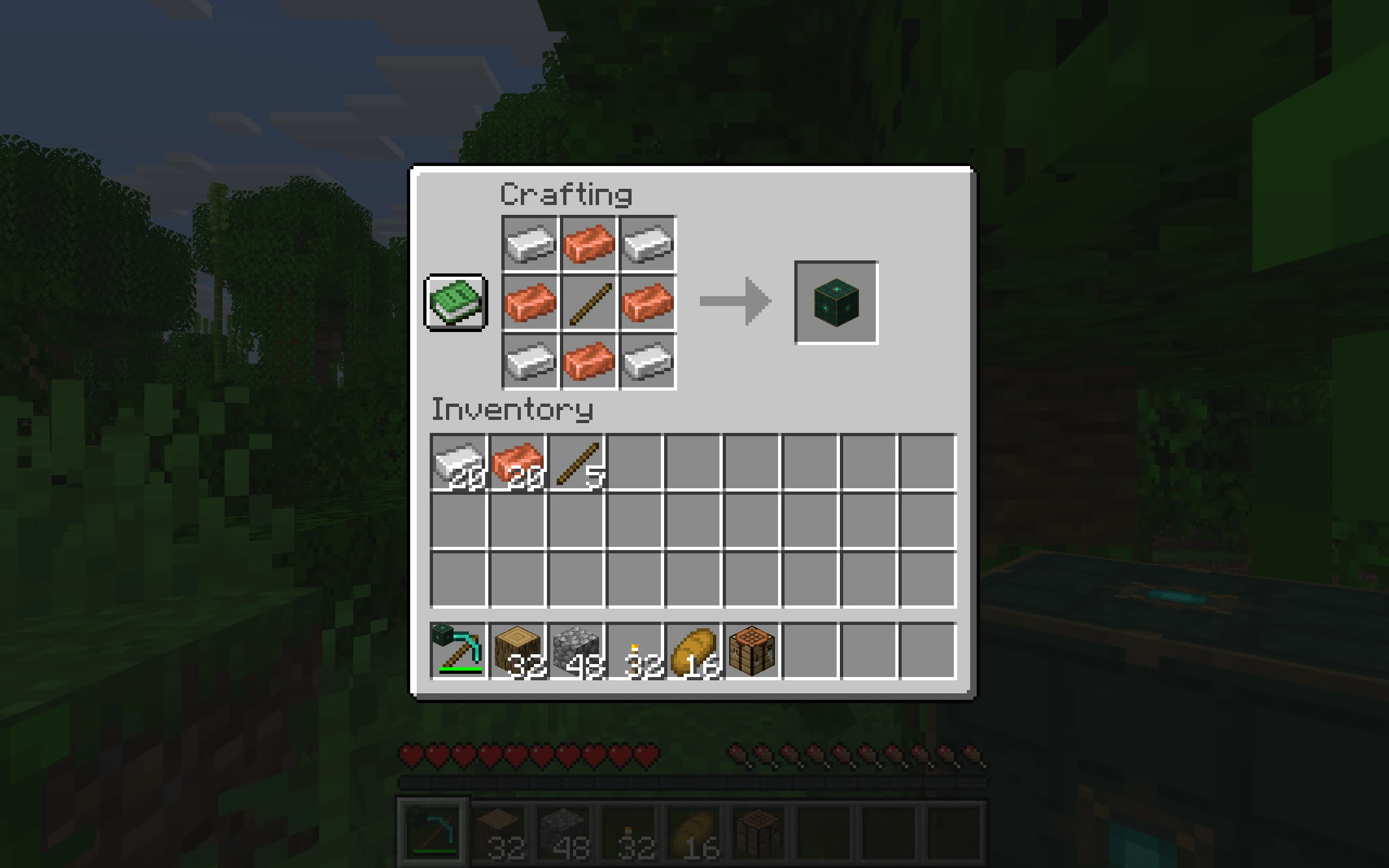
An ordinary crafting table produces an empty Tool Cube.
Add primary and backup equipment
Click the cube while holding equipment on your inventory cursor to store it. Each type fills its primary slot first, then its backup. Hover over the cube to inspect ten slots in two rows, with space for two original items of each type:
| Row | Left to right |
|---|---|
| Primary | Pickaxe, axe, shovel, sword, hoe |
| Backup | Pickaxe, axe, shovel, sword, hoe |
Scroll while hovering to select an occupied slot. Right-click the cube with an empty cursor to retrieve that item, then place it normally. Left-click to pick up the whole cube. Holding the cube on the cursor also lets you store equipment by clicking it, or retrieve an item by right-clicking an empty inventory slot.
Items outside the five supported equipment types, or equipment for an already full category, remain where they were.
Swap primary and backup
Select a tool with the wheel, then press Tab to exchange its primary and backup positions within the same category. The yellow frame follows the original item, and its detail bubble shows its name, real durability and current priority. This also works when the opposite slot is empty. Press Tab again to swap back; enchantments, attributes and individual durability remain intact.
Choose light or dark mode
Open Better Tools' configuration from the mod list, or enter /bettertools config on the client. Choose Light or Dark and select Done to save it for this game instance. Cancel keeps the previous choice. Both modes use the same slots and controls, with only a yellow frame marking the selection.
Use it from your hotbar
Select the cube in your hotbar. Transformations show the real tool immediately and retain accumulated attack charge. Ordinary swings still consume vanilla attack cooldown.
Gathering and tool fallback
Looking at a block first chooses a primary tool that can harvest it, then a backup in that category or another effective tool. A stronger backup does not displace a primary that can do the job.
If a category is missing, no effective tool is available, or you look into air, the cube keeps the current usable tool, then falls back to the remembered tool or another remaining item. It returns to its shell only when no usable equipment remains. For example, looking at wood without an axe does not stow the pickaxe you were holding.
Fallback does not change vanilla harvest or drop requirements. Ore that needs a particular pickaxe tier still requires a suitable item inside the cube.
Keeping a weapon ready
Aiming at an unobstructed creature within 32 blocks prepares a weapon before you reach melee range. An incoming entity hit also prepares one immediately. Actual attack reach still follows vanilla rules.
Selection favors a sword, then falls back through axe, pickaxe, shovel and hoe. Each category uses its primary before its backup.
Swinging a sword starts the combat hold, even if it misses. Looking across ground or walls does not switch weapons away. Each combat swing or incoming hit refreshes the five-second timer (100 game ticks). When the target dies, or five seconds of game time pass without another attack or incoming hit, selection follows your aim again; aiming at another creature keeps a weapon ready.
Tilling with a hoe
Right-clicking tillable soil prefers the stored hoe, while left-click gathering still follows the block's tool category. Vanilla soil, face and space checks remain. Without a hoe, the current tool retains its vanilla right-click action. Tilling does not interrupt a combat hold.
Durability and backup equipment
The actual equipment takes damage. Enchantments, custom properties and each item's durability remain intact. When a primary breaks, its backup takes over; if the category is exhausted, other usable equipment remains available. This also applies to a hoe breaking while tilling, and the backup keeps its own wear.
The hotbar shows the current or most recently used tool with a cube badge and that item's durability bar. Automatic switching pauses while you edit the inventory.
Update an existing instance and cube
Updating the launcher makes new built-in packages available. Update the mod in each existing instance separately:
- Save and exit Minecraft normally.
- Open Content → Mods → Built-in mods, check Better Tools again and choose Install selected.
- Start the instance after installation finishes.
An older package becomes selectable again when its contents change, even if the displayed version number is the same. Existing eight-slot cubes expand to ten slots while keeping their original equipment, without unloading and repacking them. For multiplayer, update both the server and clients to matching packages.
Play with friends
Install Better Tools on both the server and clients. See Installation & versions for available game and loader combinations. It works independently of Rodel UI and Rodel AI.