
RMCL includes three optional game mods: Rodel AI, World Reroll and Better Tools. Choose them under Content → Mods → Built-in mods without looking for separate downloads or installing development tools.
Select and install
- Select the target instance on the Content page and prepare its game version and loader.
- Switch to Mods and open Built-in mods.
- Check the features you want. Matching built-in dependencies are prepared too.
- Review the checked items and choose Install selected. Follow progress and results on the Content page.
- Start the instance. If Minecraft is already running, exit normally and restart it.
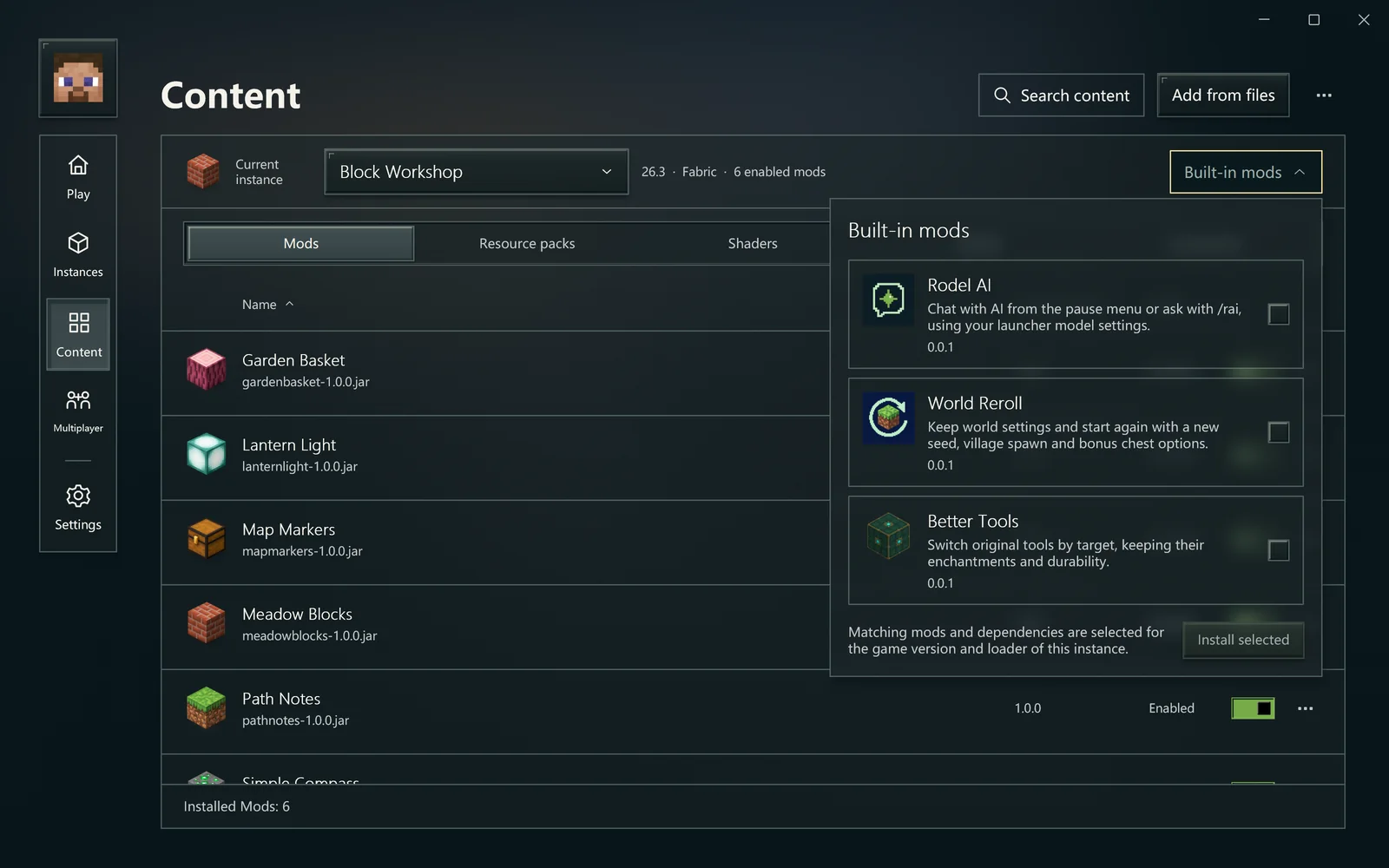
Packages match the selected instance; compatible installed dependencies can be reused.
Unchecking a box changes this installation selection. Remove an installed mod through the ordinary content list.
Update an existing instance
Updating the launcher provides new built-in packages. Install those updates into existing instances here: save and exit Minecraft, select the original instance, check the features to update and choose Install selected, then start the game again.
A package becomes selectable again when its contents differ, even if its displayed version number has not changed. Matching enabled packages stay checked, with the checkbox disabled to prevent selecting them again. Installation replaces the older package while retaining compatible shared dependencies. Multiplayer servers also need matching updated packages.
Choose your features
| Mod | What it adds | Guide |
|---|---|---|
| Rodel AI | Continuous conversations from the pause menu or chat | In-game assistant |
| World Reroll | Another world opening with your game settings retained | World rerolling |
| Better Tools | Ten primary/backup slots, combat hold and tilling | Tool Cube |
Select the three mods independently. None depends on Rodel UI, and each owns its theme settings. The installer prepares only the dependencies required by the actual game and loader combination.
Rodel UI is no longer bundled
Rodel UI has been removed from the built-in list and normal release packages. Its source remains a separate experimental module. Installing Rodel AI, World Reroll or Better Tools no longer installs or requires it.
Updating the launcher does not automatically remove or disable an existing Rodel UI installation. Decide whether to keep it; remove it from the ordinary mod list after checking the target, rather than repeatedly unchecking it in the built-in installer.
Available combinations
| Game and loader | Included features |
|---|---|
| 26.3 · Fabric, Quilt, Forge, NeoForge | All three mods |
| 26.2, 26.1.2 · Fabric | All three mods |
| 1.21.11 · Fabric | Better Tools |
| 1.20.1 · Forge | Rodel AI with that version's native interface |
Matching Fabric API is included for Fabric and Quilt. The picker shows available packages or a compatibility reason for the current instance. Forge 1.20.1 AI uses that version's native interface. Ordinary mod installation remains available for other instances.